


Ask MacRumors
iPadOS 27 New Features
Contents
iPadOS 27 is the latest version of iPadOS, the software that runs on the iPad. Apple demoed iPadOS 27 at WWDC, and it's now available to developers and public beta testers. iPadOS 27 will launch this September.
Apple has different operating systems for the iPhone and the iPad, but they share many similarities. Most of the features that are available in iOS 27 are also available on the iPad. There are sometimes features exclusive to Apple's larger-screened devices, but this year, almost all capabilities are cross-platform.
iPadOS 27 introduces Siri AI, an overhauled version of Siri that's much smarter and more capable than before. iPadOS 27 adds new Apple Intelligence features in apps, updated parental controls, and performance improvements that speed up your iPhone.
Siri AI uses generative AI models and it performs more like ChatGPT or Claude than the prior version of Siri. Siri can hold back-and-forth conversations, and it has access to your personal data so it knows more about you and can complete complex tasks. It can search across Mail, Messages, Notes, Reminders, Calendar and other apps to find things for you. Siri has broad world knowledge and can search the web to answer questions for you on any topic, plus it is able to see what's on your screen so you can ask for more information about what you're looking at. Siri can also take action in apps, doing things like drafting emails, adding events to Calendar, and adding Photos to an album.
There is a standalone Siri app where you can talk to Siri, revisit existing conversations, and see a history of your chats. On the iPad, the app has a dedicated sidebar and support for windowing. The Siri app is available on compatible iPads, Macs, iPhones and more, and conversations sync across devices. Siri lives at the top of the iPad's display, and swiping down from the top of the display brings up a new Search or Ask interface that replaces the Spotlight Search interface. Apple rebuilt the search index for Siri AI, so content is indexed faster and it brings up more relevant results, especially in the Mail app.
You can type to Siri from Search or Ask, say Hey Siri, or activate Siri with the top button, and you'll see a new Siri animation. Concise Siri responses show up at the top of the screen, and you can swipe down for more information or to ask a follow-up question. You can upload files and photos by tapping on the "+" button. On the M4 iPad Pro/Air and later with 1TB+ storage, you can set a custom voice for Siri, with personalized pace and expressivity. Apple's newest iPads also support improved dictation capabilities with special on-device AI models.
Visual Intelligence has expanded to the iPad, and it can be used whenever you take a screenshot to get information on what you're looking at, with options to highlight specific information with Apple Pencil. Visual Intelligence has new capabilities, and it can tell you the nutritional info from a meal, import multiple events to your calendar at one time, split up a receipt for you, import contacts from a business card photo, or import a membership card into the Wallet app.
Siri is integrated into apps with systemwide context menus so you can select text or images and then ask Siri about your selection. With the Write with Siri feature, Siri can generate text from scratch, correct your grammar, or give feedback on your writing. Siri can even write in your own style when composing email and text messages, and it works with handwritten notes. For the AirPods, Apple added a redesigned Settings interface and custom EQ for personalizing AirPods sound by adjusting lows, mids, and highs.
The Photos app has AI photo editing tools. Clean Up is better at removing objects from images and filling in missing areas, and there are Reframe and Extend options. Extend lets you change the crop of an image, using AI to generate new fill, while Reframe combines AI and spatial images so you can change the perspective or composition of a photo. iCloud Shared Albums support full-resolution sharing, and friends with Android and Windows devices can contribute images to iCloud albums. There's also a new 30-day expiration option and an option to sync content immediately to iCloud for quicker uploads.
Any set of photos or videos can be played as a slideshow, and you can save a video frame as a photo. Apple added a Captured by Me collection in the Photos app. With the new Selection View, you can review and modify metadata like location for multiple images, and there is support for keywords and star ratings.
Safari can automatically organize tabs, bookmarks, and Reading List by topic, create custom extensions for you based on natural language prompts, and monitor webpages for changes with Notify Me, letting you know when an update is detected. The Passwords app uses AI to change weak and compromised passwords for you, upgrading them to strong passwords. When saving files or folders, Apple Intelligence will suggest names based on content.
Image Playground was overhauled, and it generates images in any style, including photorealistic. You can create images of people, modify images using descriptions for small changes, and make tweaks with touch gestures. Image Wand in Notes can now transform a rough sketch into a photorealistic image. Apple also updated Genmoji to be faster and better quality. Image Playground supports creating Contact Posters, images for social media, and more with different aspect ratio options. Image generation and similar resource-intensive AI features will have daily usage caps with more access tied to paid iCloud+ plans, but Apple's AI features will be otherwise free.
The Shortcuts app can create shortcuts for you based on natural language requests. Just tell it what you want a shortcut to do, and the app will generate it automatically with AI. On the iPad, Shortcuts now supports Magic Keyboard triggers so you can have a shortcut run when you attach a keyboard. Calendar and Reminders support natural language for adding and modifying events and tasks. The Maps app uses aerial imagery and Vision Intelligence models for enhanced Flyover with sharper, more lifelike detail. The Journal app supports generative writing prompts for writing inspiration.
In the Home app, HomeKit Secure Video supports 4K capture, and it uses AI to summarize activities from video footage. Multiple notifications are aggregated, and it can stitch together footage from multiple cameras for a complete picture of what's happening. It also supports searching for specific moments.
Mail makes intelligent suggestions for taking action on content with apps, and in Messages, there are AI suggestions for actions you might want to take like inserting a photo or sharing a location. Sending large photos and videos no longer slows text conversations, and there is a send indicator for outgoing messages. Tapback notifications are now consolidated, so you get fewer notifications.
The Phone app has Call Context, a feature that brings up relevant on-device information you might need when calling a business for help, like a flight number. The Music app has new artist pages and AutoMix has more immersive transitions. The Clock app supports setting alarm volume independent of system volume.
There's now a Liquid Glass slider for customizing translucency level, and Apple updated Liquid Glass to improve readability. Toolbars are more uniform to make text headings and larger groups of controls more legible in apps like Mail, and sidebars extend to the edges of windows instead of float. Sidebar icons are also once again colorful, and Apple now uses menu bar icons selectively to make it easier to find commonly used actions. Liquid Glass icons have more detail and sharpness, and navigation bars, menus, and buttons have more depth and separation. The Home Screen supports extra large widgets for apps like Calendar, Photos, and Music.
Apple focused on performance improvements across iPadOS 27, and everything feels faster. Apps launch quicker, AirDrop transfers are faster, the keyboard loads quicker, swapping Home Screen pages is speedier, and App Library is faster. Browsing files on iPad and transferring them to an external USB drive is up to five times faster, and it is just as fast as Finder on a Mac.
Gestures for closing, switching, and dragging windows are quicker, and multitasking is faster. Context menus in iPadOS open faster when using a cursor, and Apple expanded the CPU scheduler to all iPadOS 27-supported iPads for faster performance.
App names show in the iPad's status bar to make it easier to see which app is active, and it's quicker to get to the menu bar by tapping on or hovering a cursor over the app name. iPhone apps that run on iPadOS can be resized to be bigger.
Apple is updating parental controls and introducing child safety features in iPadOS 27. Screen Time has been redesigned, and parents can see the apps and websites children are visiting and make adjustments in real-time. Time Allowances let parents set the amount of time children can use app categories like Entertainment, Games, and Social Media, with customizable schedules based on time and day.
Ask to Buy and Ask to Browse require kids to get parental permission for every app download and new website visited in Safari, plus parents can manage contacts and require permission before kids contact someone new. Communication Safety now blocks gore and violence in addition to nudity in Messages and FaceTime.
iPadOS 27 is available on the 6th-generation iPad mini and later, the 9th-generation iPad and later, the 2nd-generation 11-inch iPad Pro and later, the 4th-generation 12.9-inch iPad Pro and later, and the 4th-generation iPad Air or later.
Siri AI is available in English and will expand to other languages in the future. Siri AI for iPhone and iPad will not initially be available in the European Union because of issues with the Digital Markets Act. Siri AI and the new Apple Intelligence features are not available in China.
Note: See an error in this roundup or want to offer feedback? Send us an email here.
Design
With iPadOS 27, Apple is updating the look of the Liquid Glass design introduced in iPadOS 26. Liquid Glass is now customizable, and there is a slider in the Settings app that lets you choose the level of translucency you want. You can pick a clear option to let more of the background show through, or an opaque, tinted option to minimize the Liquid Glass effect.
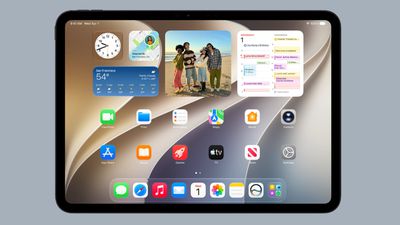
Apple also made overall Liquid Glass design changes. Complex content behind menu bars, navigation bars, and other interface elements is better diffused. Darkened edges and brighter specular highlights give more depth and separation to the interface, so controls more clearly stand out from what's below.
App icons have been updated with additional layers of Liquid Glass for more detail and sharpness, toolbars are more uniform across apps, and sidebars are edge-to-edge and no longer float.
Sidebar icons have color again to make it easier to distinguish between apps, and icons are now more selectively used for menu bar items to cut down on visual clutter.
On the Lock Screen, Apple Intelligence can automatically expand a photo to fill the entire display. If an image is cropped too tightly or doesn't match the iPad's aspect ratio, iPadOS 27 is able to generate more image context using an Extend feature. Image Playground can also now be used to generate custom wallpapers.
Siri AI
Siri AI is the single biggest new feature in iPadOS 27. Apple entirely overhauled Siri, adding a dedicated Siri app and making updates that put Siri on par with chatbots like Claude and ChatGPT.

Apple says Siri has understanding and reasoning that weren't available before, with multiple improvements that change how Siri works.
All of the different Siri functions come together to allow Siri to do far more than it could before. You can have full back-and-forth conversations with Siri, and include multiple tasks in a single request.
Personal Context Understanding
Apple overhauled its search index, and Siri has access to emails, text messages, files, photos, notes, and more. Siri can find content from across your apps, but it also understands that content. You can ask Siri to surface photos, bring up information from emails or texts, or find files, and the Apple Intelligence semantic index behind the scenes finds what you need.
- What was that movie my brother told me to watch last week?
- Can you get me the directions to that place I was supposed to meet Eric tomorrow?
- What video games did John recommend to me last year?
- Find images with pancakes from 2024
- What was the name of that restaurant I ate at in February?
- What's the confirmation number for my upcoming flight?
- What do I need to do tomorrow?
- Show me my photos from the music festival last weekend
- What's the door code Sarah texted me?
- Find the lease my landlord emailed me last month
- Who did I have lunch with two Tuesdays ago?
Broad World Knowledge
Siri can search the web for up-to-date information to answer questions about anything, similar to other chatbots. Siri can analyze documents and get information from the web for additional context, help come up with recipes, do party prep, help with homework, give gardening tips, assist with DIY projects, and much more.
- When is the Suki Waterhouse show in SF?
- How can I get tickets?
- I'm planning a birthday party, can you find me some good cake recipes?
- What's the difference between pine warblers and goldfinches?
- What's the Hurricanes score?
- What are the hours for the closest Ace Hardware?
- What's a good substitute for buttermilk?
- What's a 15% tip on $84?
- Help me plan a 5-day trip to Lisbon
Onscreen Awareness
Siri knows what's on your iPad's display and can answer questions about it. Siri can tell what you're looking at, read text, and analyze images.
Siri can tell you where a photo was taken if there's something recognizable in it, and you can ask questions about any app you're in without having to provide specifics.
- Where was this photo taken?
- Summarize this
- Does this document look correct?
- What is this?
- Translate this menu
- Explain what this chart is showing
App Actions
App Actions allow Siri to use tools in apps to complete requests. Siri can use some apps on your behalf, including apps from Apple and third-party apps that have implemented App Actions support.
- Write a quick response to this email
- Send all the photos from today to Eric
- Add a 3pm Tuesday meeting with the neighbor to my calendar
- Add these photos to the cat album
- Get me directions to the post office, but add a stop at the coffee shop first
- Move my 2pm meeting to Thursday
Siri Design
A new Search or Ask interface replaces Spotlight search, and it can be accessed by swiping down from the top of the display. You can type or speak a question or request to Siri using this gesture, or activate Siri with a wake word or by holding down the top button as before.
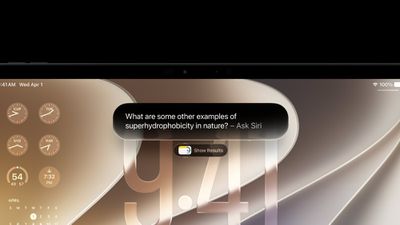
An animation is displayed as Siri is thinking, and then the Siri bubble expands into a short response. If you swipe down on a response, it brings up a text bar where you can provide clarification or ask another question. A "+" button lets you add images or documents to the conversation.
Some responses use rich information cards pulled from apps. If you ask Siri about the weather, you'll see the current weather forecast. If you ask about upcoming calendar events, you'll see them listed in the Calendar app format.

Siri works in any app. You can select text or images, then ask Siri about the selection. If you see an image in Safari you want to know more about, you can long press it to select and then ask Siri whatever you want about it.
Siri App
There is a dedicated Siri app where you can start new conversations or revisit past chats you've had with Siri.
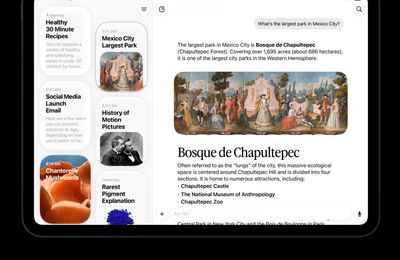
The app has a card-style interface with details on your most recent chats across all of your devices. You can also use the search button to find conversations, and there's a pin option for ones you revisit frequently.
The Siri app is cross-platform and content syncs across all of your devices.
Write with Siri
In iPadOS 27, you can write with Siri anywhere you type with a systemwide Write with Siri feature. Siri can draft documents from scratch, and in Mail and Messages, it can use the same writing style that you normally use.
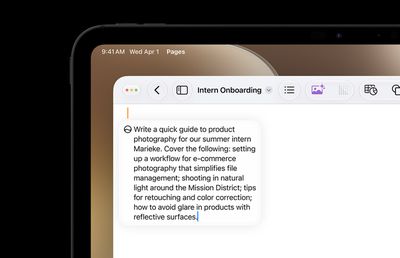
Siri can give you feedback on your writing if you select your text and ask Siri how it sounds, and as you type in apps, there's automatic proofreading for misspellings and grammar. Siri can also edit, and you just need to describe the change that you want to make to something you've written, such as changing the tone to be more professional.
- Make this email sound more formal
- Turn these bullet points into a paragraph
- Shorten this to three sentences
- Draft a thank you note for a gift
- Rewrite this to be friendlier
- What do you think of this presentation?
- How can I improve this email?
Write with Siri works with handwritten notes done with a finger or with the Apple Pencil.
Apple's AI Models
The Apple Foundation models used for Siri and other Apple Intelligence features are the result of Apple's collaboration with Google. Apple used the technologies behind the Gemini AI models to develop the next generation of Apple Foundation models.
Apple's AI models are integrated into iPadOS and coordinated with a system orchestrator that can use the Spotlight index and the app toolbox.
The Spotlight index surfaces data from any app that integrates with it, such as Mail, Calendar, and Messages. The app toolbox identifies which app tools might be useful to answer a request.
Privacy
Apple's Siri features run on-device and on cloud servers using Private Cloud Compute. Apple says data is not accessible to Apple or to third-party companies.
Private Cloud Compute servers have historically all been Apple servers in Apple data centers, but Apple is expanding Private Cloud Compute to run Apple Intelligence workloads on Google Cloud using NVIDIA hardware.
Availability and Requirements
Siri AI is available in iOS 27, iPadOS 27, macOS Golden Gate, visionOS 27, and watchOS 27, so you can start a Siri request on one device and revisit it on another device.
The Siri app is available on most of Apple's software platforms. Siri AI features are also available when using CarPlay and AirPods.
Siri AI requires a device that supports Apple Intelligence, which includes iPads with an M-series chip and the A17 Pro iPad mini.
Siri AI works in English (Australia, Canada, Ireland, India, New Zealand, South Africa, UK, U.S.), and will expand to more languages in the future. While Siri AI is not available on iPhone and iPad in the European Union, Mac users in Europe do have access.
Visual Intelligence
iPadOS 27 brings Visual Intelligence to the iPad for the first time, and it mirrors the capabilities available on the iPhone.

Visual Intelligence on the iPad works with the screenshot interface. You can capture a screenshot and then highlight the part of the display that you want to take action on.
Siri can search for images, summarize, translate, identify objects, add information from the screen to apps like Calendar or Reminders, answer questions about what you're looking at, and more. Visual Intelligence on iPad has all of the same features as Visual Intelligence on iPhone, and it includes the new Visual Intelligence features like telling you nutritional information for food or splitting out a bill.
- Nutritional Insights - You can select a picture of a meal or a food item to check its nutritional value. Siri doesn't tell you specific calories in an item, but it can tell you if what you're eating has nutritional value and what's good or bad about it.
- Bill Splitting (U.S. only) - If you have a photo of a restaurant bill, you can split out what you ate and then send money via Apple Cash. Or calculate what everyone owes and request money.
- Import Multiple Events - You can import multiple events into the Calendar or Reminders app at one time from a schedule or list.
- Import Contacts - You can import contacts from a photo of a business card.
- Wallet Passes - You can turn a photo of a barcode from a membership or pass into a Wallet pass.
Visual Intelligence can read laundry labels and give you clear instructions, look up items and find reviews on the web, identify odd devices or cables and tell you what they're for, scale recipes, read ingredient lists for you to check for allergens, transcribe messy written notes or lists into text, decipher confusing parking signs, offer plant care advice, solve math problems on a worksheet, and whatever else you can think to ask AI to do.
Other Visual Intelligence Capabilities
Visual Intelligence has a long list of things it can be used for, and these are the capabilities previously available on the iPhone.
- Identify plants, animals, insects, landmarks, art, sculptures, books, and more.
- Add items to your calendar from an image like an event poster or flyer.
- Use Google Image Search to find similar images.
- Search Etsy, Amazon, Anthropologie, and other apps for an item using an image on your iPad.
- Translate, summarize, and read text aloud.
App Updates
Most of Apple's apps were updated with new features that are available across the iPhone, iPad, and Mac. Some of what's new requires a device capable of Apple Intelligence, so you'll need an Apple silicon chip or the iPad mini with A17 Pro.
Photos
There are new and updated Apple Intelligence tools in the Photos app, which you can get to through the editing interface.
Clean Up
Clean Up uses new AI models, and it's better at removing objects. The original version of Clean Up was best for small items with little complexity in the surrounding area, but now it is able to do more work reconstructing backgrounds with generative AI.
There are now three options for object removal. Fast is the quicker option and can still be used for simple edits, while High Quality works better for more detailed scenes. Auto lets the Photos app decide which option is best.
Extend
Extend lets you change the crop of an image, expanding the borders around content to zoom out a bit or change the photo's composition. It uses generative AI to fill in missing areas, and you can adjust the borders with drag gestures.
Reframe
Reframe can change the perspective of the photo, making adjustments to the angle of a person or object. It draws on the spatial information captured when a photo is taken, and combines it with AI to change the angle of the camera in post-processing. The spatial data is used for adjusting the subject of the image, and then AI fills in any pixels that are missing.
Other New Photos Features
- Videos to Photos - You can save a frame of a video as an individual photo.
- Metadata - Apple now lets you add keywords and star ratings to photos and videos in the Photos app. You can rate images with one to five stars and then filter images by rating.
- Cross-Platform Albums - Android and Windows users can now contribute to Shared Albums. It's easier to invite people to share with a dedicated "Create Shared Album" option in any album menu. Full-resolution photos and videos can also be added to iCloud Shared Albums, with support for all common photo and video formats.
- Shared Albums - Shared Albums can be filtered by photos or videos, there's an activity log, and it's easier to save images from Shared Albums. You can also react to images in Shared Albums with any emoji.
- Expirations - You can set Shared Albums to expire after 30 days, which is useful for sharing photos without having a permanent album.
- Slideshows - You can create a slideshow from any album or collection of images in the Photos app instead of being limited to what's in the Memories section.
- Utilities - There are two new Utilities folders in the Photos app. Captured by Me includes all of the images that you've taken from the Camera app on your current or past iPhones and iPads, while Identity Documents aggregates pictures of passports, licenses, and similar documents.
- Collections - The Collections tab is faster to render.
- Selection picker - A "Show Selected" option in the Library shows you all of the photos you have checked so you can modify metadata.
Safari
Safari uses Apple Intelligence to organize your open tabs into relevant topics, grouping like concepts together to make it easier to browse your open tabs. If you're searching for a new couch while also planning a weekend trip, websites that you open for each topic are grouped together.
This Safari tab interface lets you see all of the groups and filter by topic so you can open just the related tabs.
There is a new "Resume Browsing" section of the Start Page that lets you continue browsing topics you recently closed or topics you have open on other devices.
Custom Extensions
You can use AI to create Safari Extensions in iPadOS 27 with Apple's new Create an Extension option.
In the Safari settings accessible from the left of the URL bar, tapping Create an Extension brings you to an interface where you can type in whatever you want an extension to do. Apple also includes suggestions in categories that include Boost Productivity, Improve Focus, Get Creative, and Develop and Design. Some of Apple's extension suggestions:
- Create a citation for the current webpage and copy it to my clipboard
- Create a 3-minute focus timer for the page
- Set the minimum font size to 14pt
- Turn the page into pirate speak
- Style websites like 90s websites with bold colors and type
- Every time I open a new tab, draw me a different flower
- Highlight and show the dimensions of webpage elements when I tap on them
- Enter the design mode for a website so that I can edit the contents
Notify Me
Safari can monitor a website for changes and alert you when new information is detected. Apple says it's useful for monitoring when concert tickets go on sale or watching for a product to be restocked.
To use it, navigate to a website, then tap on the settings icon to the left of the URL bar, and choose the Notify Me option. You can type in what you want Safari to watch for and set a frequency and a time.
At most, Safari will check websites once per hour at a set time, with daily, weekly, and monthly checks also available.
Performance Improvements
Apple says Safari's power efficiency has improved, so it will drain less battery. Web apps and start page content load faster, JavaScript handling is faster, and animations and graphics are smoother.
iPadOS 27 has an overhauled search system that extends to the Mail app. Instead of surfacing results based on keywords and recency, the Mail app search ranks results by relevance and intent.
If you search for "Sprouts" because you want to find a recent order, it'll show your order before it shows marketing emails you might have from the same retailer.
Smart Replies that your iPad suggests to you are now tuned to your writing style, which means suggestions sound like things you might actually type. The contextual suggestions that you see at the top of the Mail app are now available to third-party apps, plus Apple has revamped the design.
An email that includes a flight time or a restaurant reservation has a button for adding it to the Calendar app. An email with directions may let you see the route in Maps, and emails with tracking information can be tracked with the Wallet app.
Messages
Messages consolidates notifications for Tapback responses, which is useful when you're in a group thread and tons of people are sending emojis, and when a message fails to send, your device will retry sending it.
The Messages app also supports continuous sending of photos, videos, and texts. If you're sending someone a photo and your connection is poor or you go offline, it resumes sending when the connection is restored.
Cross-device syncing is improved, so conversations will sync more reliably across the iPhone, iPad, Mac, Apple Watch, and Vision Pro. Fewer messages will fail to sync and display properly when you switch between devices. Messages, read states, reactions, and attachments sync faster.
Genmoji
Apple revamped Genmoji creation. There's an updated interface for describing an emoji that you want, with options to start from an existing emoji, choose an image from Photos, or select a person.
After uploading an image or using a text phrase to create a Genmoji, there's a new "Describe a change" interface for making updates to what you've already created. You can iterate on designs and change individual elements of a Genmoji, tweaking colors and objects. Each change uses the old base instead of regenerating a new Genmoji.
With a series of requests, it is possible to make a complicated, multi-element Genmoji. Along with describing changes, you can add in additional emoji, and the interface makes suggestions on what to do next.
Genmoji output is more consistent, and Genmoji look more like real emoji with a 3D, cartoonish style by default. There is now an option to change style, so if you don't want the cartoonish look, you can ask for something else like a drawing or a sketch.
Music
The Apple Music app has new artist pages with improved art and motion to make them come alive. AutoMix has been improved and it includes transitions that Apple says "feel more immersive and engaging."
Image Playground
The Image Playground app can now be used to make images in any style, including photorealistic. If you have a photo of a friend and want to add a hat or an accessory that looks real, you can do so with Image Playground. You can select specific areas in an image to modify and make AI edits using natural language, plus there's an option to combine images.

Image Playground can be used for free, but there will be daily caps, with extra usage available through iCloud+ plans.
Image Wand
You can use Image Wand in apps like Notes to create a rough Apple Pencil sketch and then turn it into a polished image using Image Playground. In iPadOS 27, Image Wand has all of the Image Playground capabilities, so you can make more realistic images.
Shortcuts
The Shortcuts app is a lot easier to use in iPadOS 27 thanks to Apple Intelligence. Shortcuts can be created using natural language, and they're more accessible to the average person.
With Describe a Shortcut, when you tap on the New Shortcut button in the Shortcuts app, it opens to the description interface.
There's a text box that asks you what you want your shortcut to do, and you can describe what you need in natural language. You can start with a single step, or add in multiple parameters. Apple Intelligence selects the correct actions, creates the automations, and folds it all into a completed shortcut. A few examples of what you can do:
- Every morning, show me my first meeting, today's weather, and my Reminders due today.
- Turn on the porch lights at night when you get a notification that food delivery is arriving.
- Text my partner an ETA when I leave work, then start playing my podcast.
- Show me a summary of my day's meetings and to-do list, and suggest anything I should prioritize.
- Give me a three-line summary of today's tech news.
Shortcuts and automations can run based on time of day, location, an app action, a system feature like a screenshot, an incoming notification, and more. Shortcuts can do all kinds of things, from accessing system features to opening and running apps.
After describing a shortcut, the app will outline each of the actions the shortcut will perform. If it's what you want, you can tap on the play button to test it. It will be added to your personal shortcuts.
If it's not quite what you want or you want to add more features, you can use the "Describe a change" interface. You can type in what you want to tweak, and go through multiple rounds of refinement until you get exactly what you want.
Once created, you can tap into a manual editing interface if you want to add more complicated actions or tweak without using Apple Intelligence. AI Shortcuts is in beta and it's not always perfect, so sometimes manual edits are required to get the end result you want. You can also open any shortcut and use the Apple Intelligence mode to make edits.
You can set shortcuts to run automatically when you connect a keyboard, like opening two apps side by side or triggering a focus mode.
Supported languages include English, Danish, Dutch, French, German, Italian, Norwegian, Portuguese, Spanish, Swedish, Turkish, Vietnamese, Chinese (simplified and traditional), Japanese, and Korean.
Home
The Home app generates written summaries for motion alerts and what's detected, using AI to determine what's been recorded. It can recognize people, animals, vehicles, packages, and general motion, giving a summary of what's happening even if you're not looking at the video footage.
It is intelligent enough to give detail, so you'll see alerts like "a person walked through the room," "two people were in the room," "a dog sat on the floor," or "a cat played in the room."
Along with analyzing footage, the Home app can now group footage from separate cameras capturing the same event. If a person walks by one camera and continues on to another, the Home app knows those two events are related. During video playback, you can see relevant footage from multiple cameras with a summary of something that happened across the entire home.
- Highlights - If there are noteworthy recordings available, they are shown in a separate section above the general recordings in the camera view.
- Search - The Home app supports natural language search for camera footage, so if you're looking for something like when a package was delivered, you can search for it.
- Notification Summaries - Notifications update in real time and related alerts are combined instead of being shown as separate notifications. The net result is fewer Home app notifications.
- Reduce Notifications - There is an Apple Intelligence section in the Home app where you can turn on video summaries and cut down on notifications.
- 4K Recording - HomeKit Secure Video cameras are no longer limited to 1080p recording. If supported, cameras can stream and record at up to 4K.
- Energy Monitoring - Accessories able to track energy usage like smart plugs now display that information in the Home app in the Energy tab.
- Remote Apple TV Updates - It's now possible to update the Apple TV remotely using the Home app, similar to how HomePod updates are installed.
- Reliability - Apple says capturing and storing HomeKit Secure Video footage is more reliable than it was before and it is less likely to miss activity. Connectivity for Thread home accessories has also been improved with Apple adopting Thread 1.4, and HomeKit accessories now pair faster.
The Apple Intelligence Home features require a 2TB iCloud+ plan or higher.
Other Apps
- Passwords - The Passwords app can use Safari to automatically change flagged weak and compromised passwords, turning them into strong passwords. The feature uses Apple Intelligence to navigate to eligible websites, sign in, and update your password with a tap.
- Calendar - You can use natural language to add and modify events in the Calendar app, making it quicker to add new content.
- Reminders - In Reminders, you can now describe a reminder in natural language and it will autofill the metadata that you mention like date, time, and location.
- Maps - Apple combined aerial imagery with vision intelligence models to give Flyover more detail. Apple says hundreds of cities around the world have more lifelike, sharper designs with more texture than before.
- Notes - The Notes app supports adding handwritten notes or sketches with the trackpad, plus there's support for copying and pasting in Markdown format. There's a new option to add divider lines and Section Links to navigate to a specific section in a note.
- Phone - The Phone app on iPad supports a new Call Context feature. It can surface relevant information from the Mail app. If you call an airline, it might show your confirmation code for an upcoming flight, or your reservation code if you're calling a hotel. It doesn't listen to what you're saying, but instead looks at the number you're calling and links it to details in the Mail app.
Performance Improvements
With iPadOS 27, Apple focused on making improvements to iPadOS performance, speeding up everything from system animations to AirDrop transfers. iPad performance is smoother and faster on all iPads able to run iPadOS 27.
App Launching
Apps launch faster in iPadOS 27, and that includes Apple's own apps and third-party apps. When you're opening apps dozens of times a day, less loading time adds up and makes the system feel faster.
Browsing and File Transfers
Browsing files and transferring files to an external USB drive is up to five times faster, and just as fast as Finder on a Mac.
Windowing
Apple says closing, switching, and dragging windows across the screen while multitasking is faster than before.
Rebuilt Search Index
Apple rebuilt its search foundation in iPadOS 27, giving Spotlight, Photos, Mail, and other apps a more complete index of content that stays updated throughout the day.
In the Mail app, there's a new ranking system that surfaces more relevant emails for search queries instead of listing results by date. You'll see up to five ranked Top Results now.
iPhone App Resizing
iPhone apps that run on iPadOS can be resized so you can see more content on the larger display.
CPU Scheduler Improvements
iPadOS includes a CPU scheduler that manages computational resources across workloads as you use your iPad. Apple says it optimized the CPU scheduler in iPadOS 27 to more efficiently handle performance-intensive tasks.
Apple extended CPU scheduler optimization to all iPads that run the update, so even users with older iPads will get faster performance.
Automatic Message Resending
When a message, photo, or video fails to send in iMessage, your iPad will automatically retry sending it instead of throwing up a red exclamation point and forcing you to manually try again.
Sending photos and videos when you have a poor connection also does not pause a Messages conversation while the content sends. Each photo or video has its own progress bar, and your texts will still go through while you wait for images and video to upload.
Status and Menu Bars
App names show in the status bar on iPad so you can see which app is active when multitasking in windowed apps.
The menu bar is faster to access by tapping or hovering a cursor over the app name in the status bar, or it can be set to always show. Apple also made context menus in iPadOS open faster when you're using a cursor.
Mail Badges
If you're tired of unread Mail badges popping up when you have read all your emails, iPadOS 27 addresses the issue. The Mail app badge is now less likely to show an inaccurate number of unread emails.
More Useful Improvements
- AirDrop transfers are quicker, and AirDrop is faster to find nearby recipients
- Text recognition in images and documents is quicker
- Safari has better power efficiency and web apps are faster
- Unlocking an iPad, scrolling through Home Screen pages and App Library, and scrolling in Control Center are all smoother
iCloud Updates
- Link Previews - iCloud collaboration links now show richer previews so you can more clearly see what you've been sent.
- Access Requests - Users can send access requests for items shared via iCloud.
- Speed - Apple says users will get faster access to shared content on iCloud.com.
- Links - Creating links to iCloud content is easier with a more accessible share link.
AirPods
Apple added a custom EQ feature for the AirPods in iPadOS 27. There are options for adjusting lows, mids, and highs. Custom EQ is available for AirPods with an H2 chip, which includes the AirPods Pro 2, AirPods Pro 3, AirPods 4, and AirPods Max 2.
Siri AI also works on the AirPods through a connected device. When you're wearing AirPods, you can ask Siri AI questions and make requests. Siri AI isn't a standalone feature on the AirPods, and it requires an Apple device that supports it.
Parental Controls
There are new child safety features in macOS Golden Gate, iOS 27, and iPadOS 27. Parents can select the apps a child can access, choosing a few essential apps, a curated set, or the apps that are appropriate for the individual child.
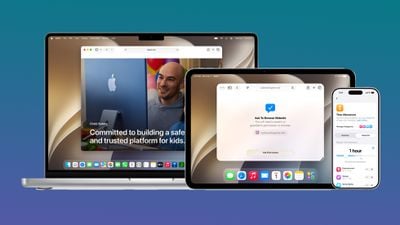
Apps can be added over time, and kids can get parental approval to download apps with Ask to Buy. A new Ask to Browse option lets parents approve each new website a child visits.
There are tools for managing who children can communicate with using Messages, FaceTime, and Phone, and parents can enable a setting that will require children to get permission before connecting with a new contact.
Communication Safety is being updated to blur gore and violence in Messages and FaceTime calls by default for users under 18. As with nudity, it will automatically blur content when gore or violence is detected in images and videos.
With Time Allowances, parents can manage the time that children spend in apps in the Entertainment, Games, and Social Media categories. Parents can set a limit based on the child's age, with suggestions from the latest expert guidance. Daily Schedules let parents limit which apps children can access and when based on time of day and day of the week.
Screen Time now gives parents an at-a-glance view of their kids' device usage and most used apps, with options to make adjustments to access in the moment. Parents are able to quickly limit access during meals, outdoor play, and other times that "deserve full attention," according to Apple.
Apple has a dedicated Child Safety website where parents can learn more about the tools available in iOS 27, iPadOS 27, and macOS Golden Gate.
Compatibility
iPadOS 27 is available on the following iPads:
- iPad Pro (M4 or later)
- iPad Pro 12.9-inch (4th generation or later)
- iPad Pro 11-inch (2nd generation or later)
- iPad Air (M2 or later)
- iPad Air 11-inch (4th generation or later)
- iPad (A16)
- iPad (9th generation and later)
- iPad mini (A17 Pro)
- iPad mini (6th generation)
iPadOS 27 drops support for the fifth-generation iPad mini, the 8th-generation iPad, the 3rd-generation iPad Air, the first-generation 11-inch iPad Pro, and the 3rd-generation 12.9-inch iPad Pro.
Launch Date
New versions of iOS, iPadOS, macOS, and Apple's other software platforms were previewed at WWDC in June. Developers and public beta testers have access to the iPadOS 27 beta right now, and can try the new features. iPadOS 27 will launch in September alongside iOS 27.
