
 Reduced 2026 fees = bigger margins. See what you saveReduced 2026 fees = bigger margins. See what you save
On this site, we use cookies and similar tools (collectively, "cookies") to provide and improve services to you and to show ads. To learn more about how Amazon uses cookies, please read the Amazon Cookies Notice.
Make your products stand out with A+ Content on Amazon
Your guide to creating product detail pages that convert browsers into customers. A+ Content adds rich imagery, comparison charts, and brand storytelling to help customers choose your product.

What A+ Content does for your business
A+ Content replaces your plain-text product description with rich images, comparison tables, and brand story modules and it is free to use if you are enrolled in Amazon Brand Registry. UK sellers who publish Basic A+ Content typically see a 3–10% uplift in conversion rate, according to Amazon internal data; Premium A+ (available to qualifying brand owners) can push that figure to 20% or more. You need Brand Registry approval, a registered trade mark, and at least one published ASIN on Amazon.co.uk before you can start building. This guide walks you through every step — from eligibility checks to publishing your first module — with UK-specific rules on VAT content, UKCA compliance claims, and Consumer Rights Act 2015 disclosures baked in.
A+ Content appears on your product detail page — below the bullet points — where customers go to learn more before they buy. Every module you add answers a customer question, reduces a purchase barrier, or builds the trust needed to click “Add to Basket.”
A+ Content appears on your product detail page — below the bullet points — where customers go to learn more before they buy. Every module you add answers a customer question, reduces a purchase barrier, or builds the trust needed to click “Add to Basket.”

Three types of A+ Content
Basic A+ Content
Available to all sellers with a Professional selling plan enrolled in Brand Registry. Up to five modules per product with text, images, comparison charts, and brand logos.
Brand Story
A dedicated “From the brand” section with scrolling carousel, links to your products and Brand Store, and your brand’s origin and values. Especially effective in the EU where customers want to know who’s behind the product.
Premium A+ Content
For eligible brands. Larger images, videos, interactive hotspots, clickable carousels, Q&A modules, and enhanced comparison charts. Up to seven modules per product.
Pro Tip: Coordinate your Brand Story with your Brand Store. Consistent narrative across both builds customer loyalty.
What are the key facts every UK seller must know about A+ Content before starting?
Sellers on Amazon.co.uk can access Basic A+ Content for free the moment they complete Brand Registry enrollment — there are no fees and no waiting period once your brand is approved. To unlock Premium A+ Content, you need at least 5 approved A+ submissions published within a rolling 12-month window on your account.
• Register your brand with Amazon Brand Registry before you build a single listing — Brand Registry is the gatekeeper for all A+ Content access on Amazon.co.uk, and you cannot publish A+ modules without it.
• Publish your first 5 A+ Content submissions within 12 months to hit the Premium A+ threshold — space them no more than 10 weeks apart to keep them inside the rolling window and avoid having early approvals expire out of the count.
• Build your Basic A+ pages around your top 5 ASINs first, since those listings carry the most traffic and give you the fastest route to your 5-submission target.
• Check that every image you upload to A+ Content meets Amazon's 72 DPI minimum and 970-pixel width requirement — Amazon UK rejects non-compliant assets at the moderation stage, which delays your approval count and pushes back your Premium A+ eligibility.
• If you sell in a regulated category such as electricals or children's products, confirm your UKCA marking documentation is in order before publishing A+ Content — Amazon UK compliance teams can suppress listings that reference product features tied to standards you cannot evidence.
Once you hit 5 approved submissions, Amazon typically activates Premium A+ access within 7 days. Use that window to plan your first Premium module, focusing on the interactive comparison charts that Basic A+ does not support.
Eight tips for A+ Content that converts
1. Lead with the benefit, not the feature. Customers buy outcomes, not specifications.
2. Balance text and imagery. Images capture attention, text provides context. Use both together.
3. Include a comparison chart. Help customers self-select the right variant without leaving your page.
4. Tell your brand story. EU customers are increasingly brand-aware and want to know who’s behind the product.
5. Address purchase barriers with Q&A (Premium). Look at your reviews — what makes people hesitate?
6. Use video to show, not tell (Premium). Customers who view videos are 3.6x more likely to convert.
7. Never embed text in images. Mobile customers can’t read text inside resized images.
8. Think mobile-first. Over 70% of sessions on many EU marketplaces are mobile.
When to create A+ Content
Just launching? Start with your lead product — the one getting your advertising budget and Vine enrolment. A strong page maximises return on every paid click.
Scaling? Apply across your catalogue using bulk upload. Every product receiving advertising should have A+ Content.
Expanding to new markets? Adapt for local customers. Images may work across markets, but localise text, comparisons, and brand story.
How do you create and publish A+ Content step by step
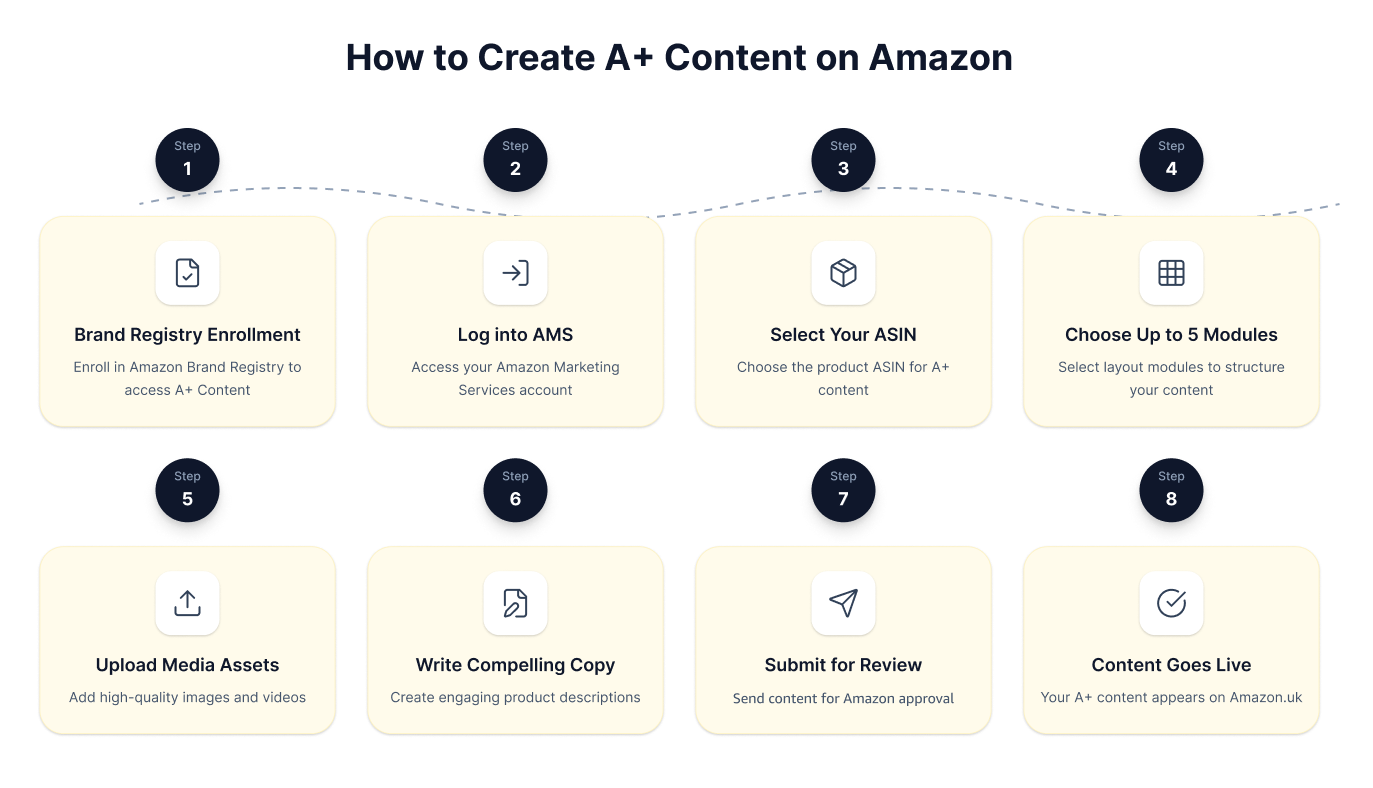
You build A+ Content inside Amazon Seller Central, and the process takes most sellers under an hour once your Brand Registry enrolment is confirmed. Select up to 5 modules per ASIN for Basic A+, submit for Amazon review, and expect a decision within 7 business days — approved content goes live on Amazon automatically with no further action required from you.
• Log into Seller Central and navigate to Advertising, then A+ Content Manager. You must have an active Brand Registry account linked to a UK-registered trademark before this menu option becomes visible.
• Choose your ASIN and select up to 5 modules from options including comparison charts, image and text blocks, and technical specification tables. Pick modules that address the top three objections UK customers raise in competitor reviews — this is the step most sellers skip entirely.
• Upload all images at a minimum resolution of 970 x 300 pixels for standard modules. Amazon's content moderators reject undersized assets within the 7-business-day review window, which resets your approval clock entirely.
• Write module copy that complies with the Consumer Rights Act 2015 — any claim about product performance or durability must be accurate and verifiable. UK Trading Standards can act on misleading product descriptions regardless of where the seller is based.
• Submit your content and monitor Seller Central daily for the first 7 business days. If Amazon rejects the submission, the rejection notice will specify which module failed — fix that single module and resubmit immediately rather than rebuilding the entire project.
Once your A+ Content is live on Amazon.co.uk, revisit it every 6 months to refresh imagery and update any compliance language affected by post-Brexit regulatory changes. Treat your first approved submission as a draft, not a finished product.
Common mistakes to avoid
Treating A+ Content as optional — every product with paid traffic should have it.
Copy-pasting the same content across all products — tailor modules to each product’s unique features.
Ignoring mobile preview — over 70% of EU sessions are mobile.
Skipping Brand Story — it’s free, builds loyalty, and creates cross-sell opportunities.
Launching and forgetting — use Manage Your Experiments to A/B test and improve over time.
Read this A+ Content guide alongside Amazon UK's main image optimisation, Brand Store setup, and Sponsored Brands guidance — these four areas reinforce each other directly. Sellers who complete all four see Brand Store sessions feed straight into A+ landing pages, compounding click-through and purchase rates across Amazon.co.uk. Start with main images and A+ Content before you activate any paid media, or you are paying for traffic that lands on underperforming pages.
• Optimise your main image before you publish A+ Content on Amazon UK. Amazon's search results reward strong click-through rates, and a weak main image will undercut even the most polished A+ module — fix the image first, then build the enhanced content around it.
• Set up your Amazon Brand Store at least 4 weeks before you run a Sponsored Brands campaign in the UK. Sponsored Brands ads that link to a Brand Store instead of a product detail page carry a lower cost-per-click floor, and your A+ Content pages sit naturally within the Store's category structure.
• Register your brand in Amazon Brand Registry before attempting to publish A+ Content — without Brand Registry approval, the A+ Content Manager in Seller Central is locked to you entirely.
• Read Amazon's UK-specific advertising policies before launching Sponsored Brands, particularly around UKCA-marked product categories where restricted claims require pre-clearance before ads go live.
• Check that your VAT registration number is current in Seller Central, as HMRC requires UK sellers generating over £90,000 annually to charge 20% VAT on all sales — an unregistered account risks suspension during Amazon's periodic compliance reviews.
Pair all five of these steps together before Q4 planning begins each year. Getting Brand Registry, A+ Content, your Brand Store, and paid media aligned by September gives you the strongest possible foundation for the UK's peak trading period.
Frequently Asked Questions
How do I qualify for A+ Content on Amazon UK, and is there a minimum number of listings I need?
You qualify for A+ Content on Amazon UK the moment your brand is enrolled in Amazon Brand Registry, which requires a registered UK or EU trademark. There is no minimum listing count — even a single ASIN is enough to get started. Once approved, you can publish Basic A+ Content across all your registered ASINs at no extra cost.
Do I need to include VAT or HMRC-related disclosures anywhere in my A+ Content on Amazon UK?
No, you do not display VAT rates or HMRC tax information inside A+ Content modules — Amazon UK handles the 20% VAT calculation and display separately at the product pricing level. What you must ensure, however, is that any claims in your A+ Content comply with the UK Consumer Rights Act 2015, meaning descriptions must be accurate, not misleading, and match the physical product the customer receives. If HMRC or Trading Standards ever audits your listings, your A+ copy will be treated as part of your commercial representation, so keep every claim factual and verifiable.
Should I add UKCA marking information to my A+ Content if my product requires it for the UK market?
Yes — if your product category legally requires UKCA marking for sale in Great Britain (which has been mandatory since 1 January 2025 for most product groups), you should reference this in your A+ Content to build customer trust and reduce return rates. Add a dedicated module that shows the UKCA mark graphic and states the standard your product is certified to, for example 'Certified to BS EN 60335-1:2012'. Keep the main compliance documentation (Declaration of Conformity) stored separately in your business records for up to 10 years, as HMRC and Trading Standards can request it.
When is the best time to publish or refresh A+ Content for peak UK shopping seasons in 2026?
Publish or refresh your A+ Content at least 3 weeks before a major sales event to allow Amazon's indexing and moderation process, which typically takes 7 to 14 business days on Amazon UK. For 2026, target a 1 October go-live date ahead of Black Friday (27 November) and a 1 November update ahead of the Christmas peak. UK customers also respond strongly to post-Christmas sales from 26 December, so queue a January clearance version of your A+ Content by 10 December.
How many images and modules can I use in Basic A+ Content on Amazon UK, and does it cost anything to upgrade?
Basic A+ Content on Amazon UK allows you up to 5 modules per ASIN, and each module can include images up to 970 × 600 pixels at a maximum file size of 2 MB. Basic A+ is completely free for Brand Registry members. Upgrading to Premium A+ (which unlocks video, interactive hotspots, and up to 7 modules) is also free for sellers who have published at least 15 approved Basic A+ Content projects and have a Brand Story live on their Store.
Start building A+ Content on Amazon today
Get your first A+ Content module live. Enrol in Brand Registry, pick your top-selling ASIN, and follow this guide — you can do it yourself, step by step.


